The lid closes.
The work doesn’t.
Lightspill keeps your Mac awake from the menu bar, like Caffeine, and keeps it running with the lid closed, on battery, with no external display. Downloads finish, builds run, the screen goes dark.
Keeping awake is free forever. Try lid mode free for 7 days in the app, then keep it with a $4.99 one-time license, delivered instantly by email.
A Caffeine that doesn't stop at the lid
Other keep-awake apps stop working when you close the lid. Lightspill keeps running. It's also careful to hand your Mac back to normal sleep when you're done.
One click to stay awake
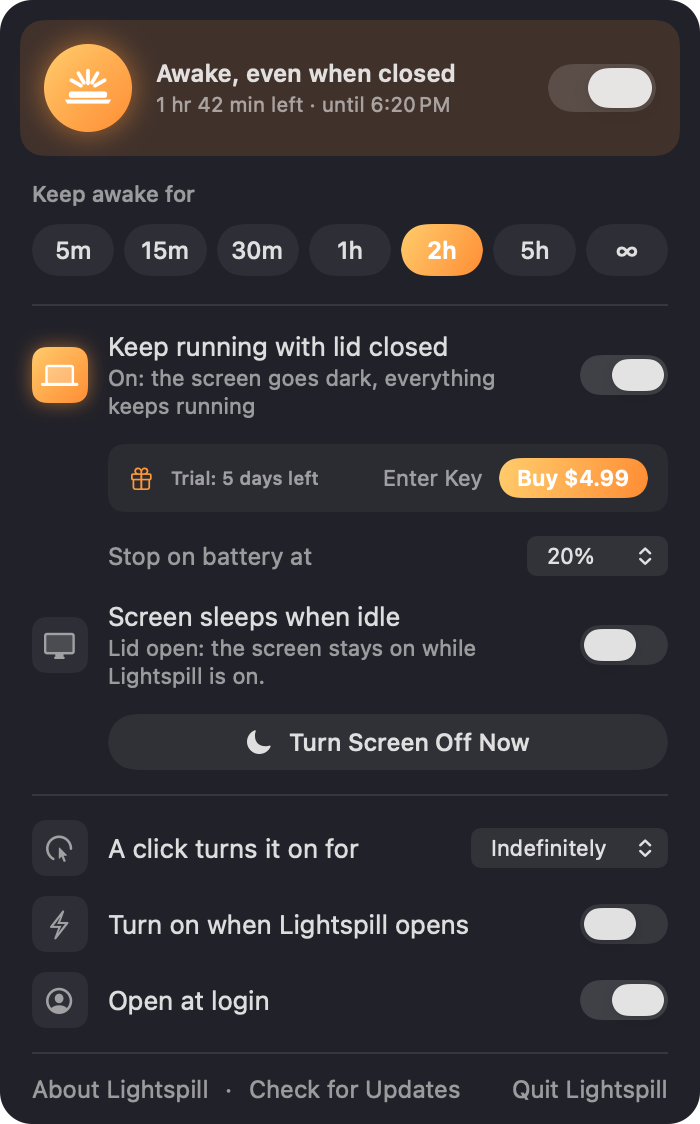
Click the laptop in the menu bar. Right-click for 5 minutes to 5 hours, or until you turn it off. A countdown shows what's left.
Runs with the lid closed $4.99
Close it mid-download, mid-build, mid-upload. On battery, with no monitor. macOS asks you to approve a small helper once.
The screen goes dark
With the lid shut, only the screen is off. Everything else keeps running, and any attached display can sleep too, to save power.
Stops before it hurts
Lid mode stands down at a battery level you pick, or if your Mac gets too hot, and the Mac sleeps like it normally would.
Never leaves it sleepless
Quit, crash, restart, uninstall: Lightspill always puts your Mac's sleep setting back the way it was. If something else turned sleep off, it tells you.
Works with Shortcuts
Open lightspill://on?minutes=30, lightspill://off or lightspill://toggle from Shortcuts, scripts or Raycast.
Free to keep awake. $4.99 to keep going.
One download. Lid mode unlocks with a one-time license key, delivered instantly by email the moment you buy. Use it on up to three of your Macs. No subscription, and nothing is ever charged later.
Lightspill
- Keep your Mac awake from the menu bar
- Timers from 5 minutes to indefinitely
- Let the screen sleep while the Mac stays up
- Shortcuts and URL control
- 7-day free trial of lid mode
Lid mode
- Keep running with the lid closed
- On battery, no external display needed
- Battery and heat cutoffs
- Up to 3 Macs per license
- Free updates
Payments, receipts and sales tax are handled by Lemon Squeezy, our reseller. Your license key is generated and emailed automatically the moment you pay. 14-day refunds, no questions asked.
Good to know
How do I unlock lid mode after buying?
Right-click the laptop in the menu bar, click Enter Key, and paste the key from your receipt email.
Why isn't it on the Mac App Store?
App Store apps aren't allowed to change system power settings, and keeping a Mac running with the lid closed takes exactly that. Lightspill uses a small helper that macOS asks you to approve once, in System Settings → Login Items. The download is signed and notarized by Apple.
Is it safe to put my Mac in a bag with Lightspill on?
Lightspill stops lid mode at the battery level you choose and if macOS reports the Mac is too hot, and then the Mac sleeps. Still, a closed bag traps heat: for long jobs, leave the Mac somewhere it can breathe.
What happens when the 7-day trial ends?
Keeping your Mac awake keeps working, free. Lid mode locks until you buy a license and enter its key. You're never charged automatically: the trial is free and needs no card. It starts the first time you turn lid mode on, not when you install.
I got a new Mac. How do I move my license?
On the old Mac, open the panel and click Remove… next to Licensed. That frees one of the three activations for the new Mac. Lost the old Mac? Email us and we'll reset it.
Does Sleep from the Apple menu still work?
Not while lid mode is holding the Mac awake. Turn Lightspill off (or lid mode) and it does.
Need help?
Email social@gdwentertainment.com.